The Best Website Builders for SEO: What Actually Moves the Needle
Not all website builders are equal when it comes to SEO. The best website builders for SEO give you clean code output, fast Core Web Vitals, editable meta tags, schema support, and crawlable site architecture out of the box. WordPress with a quality theme leads for flexibility, while Webflow and Squarespace are strong contenders for users who want visual control without sacrificing technical fundamentals.
Not all website builders are equal when it comes to SEO. The best website builders for SEO give you clean code output, fast Core Web Vitals, editable meta tags, schema support, and crawlable site architecture out of the box. WordPress with a quality theme leads for flexibility, while Webflow and Squarespace are strong contenders for users who want visual control without sacrificing technical fundamentals.
Most people choose a website builder based on how easy it looks to use, then discover months later that Google can barely crawl their site. The platform you build on sets a ceiling for your rankings before you write a single word of content. Choosing the wrong one means paying double later, either in lost traffic or a painful migration.
Key Takeaways
- WordPress (self-hosted) remains the most SEO-flexible platform available, largely because it gives you full control over code, schema, and site architecture.
- Webflow produces exceptionally clean semantic HTML, making it one of the best CMS for SEO among visual builders.
- Page speed and Core Web Vitals are now ranking signals, and builder-generated bloat is one of the most common causes of poor scores.
- Free tiers on most website builders restrict custom domains, canonical tags, and meta control, which are non-negotiable for ranking.
- The builder you choose should match your growth stage: a local service business has different SEO needs than a SaaS product or e-commerce store.
- Technical SEO foundations (crawlability, indexability, structured data) matter more than keyword density, and your platform determines how much control you have over them.

Why Your Platform Choice Affects Rankings More Than Most People Realize
Search engines don't rank websites. They rank pages, and they can only rank pages they can properly crawl, render, and understand. Your website builder controls all three of those things at a fundamental level.
Here's what most beginners miss: two sites with identical content can have wildly different rankings if one has clean, crawlable HTML and fast load times while the other buries content in JavaScript render-blocking calls. The builder determines the floor of your technical SEO.
Google has confirmed that Core Web Vitals are a ranking signal, and studies consistently show that pages loading in under 2.5 seconds outperform slower pages in both rankings and bounce rate. Many drag-and-drop builders inject unnecessary CSS frameworks, third-party scripts, and uncompressed assets that routinely push page load times past 4 seconds on mobile.
That's not a content problem. That's a platform problem. And it's one you can avoid by choosing the right builder from the start.
How Do the Top Website Builders Actually Compare for SEO?
Instead of listing features abstractly, here's how each major platform performs on the signals that matter most for ranking.

WordPress: Still the Most Powerful Option for SEO Flexibility
WordPress powers a significant portion of the web's content, and it's not a coincidence that most high-ranking informational and local service sites run on it. The core platform outputs semantic HTML, supports full control over URL structures, and pairs with plugins like Rank Math or Yoast to handle schema markup, XML sitemaps, and canonical tags without custom development.
WordPress currently powers over 43% of all websites on the internet, and among the top 1 million websites by traffic, its market share is even higher. That ecosystem advantage means more SEO plugin development, more community knowledge, and more documented solutions for technical SEO problems than any competing platform.
The one honest caveat: WordPress is only as good as the theme and hosting you pair it with. A bloated theme with 15 loaded scripts will tank your Core Web Vitals score regardless of how well you've configured your SEO plugin. Use a lightweight theme like GeneratePress or Kadence, and pair it with a caching plugin and a fast host.
For anyone exploring seo for contractors or local service businesses specifically, WordPress is almost always the recommended starting point because it handles local business schema, location pages, and blog-based content marketing better than any alternative.
Webflow: The Best CMS for SEO Among Visual Builders
Webflow occupies an interesting position. It gives designers pixel-perfect visual control while outputting genuinely clean HTML, unlike most drag-and-drop editors that produce nested divs and inline styles that confuse crawlers.
Every element in Webflow maps to proper semantic HTML tags. H1 through H6 hierarchy is editable and meaningful. Image alt tags, Open Graph fields, custom meta descriptions per page, and 301 redirect management are all built into the CMS natively. For SaaS companies and digital product businesses that want a fast, polished site without a developer maintaining WordPress, Webflow is the best CMS for SEO in that category.
Webflow's hosting infrastructure runs on AWS and Fastly's CDN, which contributes to strong Time to First Byte (TTFB) scores globally. Independent performance benchmarks have shown Webflow sites consistently achieving Lighthouse performance scores above 80 without any additional optimization when using standard templates.
Where Webflow falls short is schema markup depth and blog CMS flexibility at scale. If you're publishing hundreds of articles a month or need complex custom post types, WordPress still wins. But for a 10 to 50 page site with a focused content strategy, Webflow is hard to beat on the technical side.

Step-by-Step: Evaluating a Website Builder for SEO Before You Commit
Before signing up for any platform, run through this evaluation process. It takes 20 minutes and can save you from a painful migration later.
- Check URL structure control. Can you set custom slugs for every page and post? Platforms that auto-generate URLs like /page?id=123 hurt your crawlability and make URLs unreadable to users and search engines alike.
- Test the meta tag editor. Every page should have an individually editable title tag and meta description. If the platform applies a global template across all pages, that's a hard limitation for SEO.
- Run a demo page through PageSpeed Insights. Build or find a demo site on the platform and test it at pagespeed.web.dev. Look at the mobile score. Anything below 60 at baseline means you're starting in a hole.
- Check schema markup support. Does the platform support structured data (JSON-LD)? For local service businesses, e-commerce stores, and content publishers, schema markup is how Google understands your entity, products, and content type.
- Verify SSL and HTTPS is default. This is table stakes in 2025, but some cheaper builders still require manual configuration. HTTPS is a confirmed ranking signal.
- Confirm robots.txt and sitemap access. You need to be able to edit your robots.txt file and submit a sitemap to Google Search Console. Platforms that lock these down severely limit your crawl budget management.
What About Wix and Squarespace?
Wix has made genuine improvements to its SEO infrastructure over the past few years. Custom meta tags, a structured sitemap, and an integrated SEO wizard are all available now. The honest limitation is that Wix's rendering approach still relies more heavily on JavaScript than a clean HTML platform, and JavaScript-rendered content requires more crawl budget from Google to process.
Squarespace sits in a similar position. It's visually beautiful and has reasonable meta editing tools, but the code it outputs tends to be heavier than Webflow or a well-configured WordPress install. For local businesses or creative portfolios that aren't aggressively targeting competitive keywords, Squarespace is workable. For businesses where organic search is a primary acquisition channel, the ceiling is lower.
Common Mistakes When Choosing a Website Builder for SEO
- Choosing based on templates alone. A beautiful template on a slow platform will hurt your rankings more than an average-looking site on a fast one. Visual aesthetics and technical performance are separate conversations.
- Ignoring mobile performance. Google indexes mobile-first. A builder that performs well on desktop but poorly on mobile is failing at the index that matters most.
- Using a free plan and expecting SEO results. Free tiers on nearly every major platform restrict custom domains, add platform-branded subdomains, and often limit or remove meta editing tools. These restrictions make meaningful organic rankings essentially impossible.
- Installing too many plugins on WordPress. Every plugin adds code and potential conflicts. A bloated WordPress install with 30 active plugins will often perform worse than a leaner Webflow site. More tools doesn't mean more SEO.
- Assuming the builder handles schema automatically. Most platforms do not apply comprehensive structured data by default. For local service businesses especially, manually configuring LocalBusiness schema or using a dedicated plugin is essential.
- Migrating platforms mid-campaign. Switching from one builder to another mid-SEO campaign risks losing earned rankings if redirects are mishandled. Choose deliberately at the start rather than switching under pressure later.

Platform Considerations by Business Type
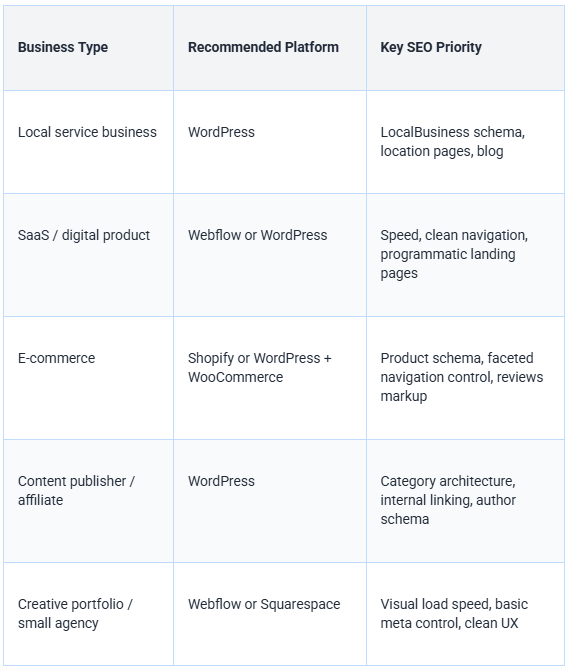
For contractors and home builders specifically, local SEO is the primary battlefield. The combination of WordPress, a fast lightweight theme, and a structured local SEO strategy covers the technical requirements that let you compete in your service area. The team at Booked and Built works specifically with contractors and home service businesses to build sites on platforms that support long-term organic growth rather than limiting it. Their approach to local seo for contractors starts with platform selection for exactly this reason.
Research into local search behavior indicates that over 75% of people who search for a local service contact a business within 24 hours. For contractors and home builders competing in local search, the technical foundation of their website directly affects whether they appear in those high-intent searches at all.
Frequently Asked Questions
Do website builders actually rank well on Google?
Yes, but with conditions. A website built on any major platform can rank well if the technical foundations are solid: clean crawlable code, fast page load, proper meta tags, and structured data. The platform determines how much control you have over those factors. WordPress and Webflow give you the most control, while some drag-and-drop builders limit what you can modify under the hood.
Does the builder's code affect SEO?
Significantly, yes. Google's crawlers read the HTML your builder outputs. If that HTML is bloated with unnecessary JavaScript, poorly structured heading tags, or render-blocking resources, it costs crawl budget and can suppress rankings. Platforms like Webflow output semantic, clean HTML by default. Some builders produce cluttered code that requires extra processing by Google's rendering pipeline before content can even be indexed.
What SEO features should I look for?
At minimum, you need: editable title tags and meta descriptions per page, custom URL slugs, sitemap generation, robots.txt access, canonical tag control, and HTTPS by default. More advanced features to prioritize include structured data support (schema markup), redirect management, image alt tag editing, and open graph controls for social sharing. These aren't nice-to-haves once you're actively trying to rank competitively.
Are free website builders good for SEO?
Generally no, for one core reason: free plans on most platforms require you to use a subdomain like yourbusiness.wix.com rather than a custom domain. Google treats subdomains differently from root domains, and all the authority your content earns goes to the platform, not your business. Free plans also commonly restrict meta tag editing and sitemap control. For any business treating organic search as a growth channel, a paid plan with a custom domain is the minimum viable setup.
What is the best builder for beginners?
For beginners who want a balance of ease of use and strong SEO capability, WordPress with a managed hosting setup is the best long-term investment. The initial learning curve is steeper than Wix, but the ceiling is far higher. If you need something that's genuinely drag-and-drop with minimal technical setup, Squarespace is the safest beginner-friendly option that doesn't severely compromise your SEO fundamentals. Wix works too, but its JavaScript rendering approach adds a layer of technical uncertainty that WordPress and Squarespace avoid.
The Platform Is the Foundation: Choose It Like One
Choosing a website builder is a lot like choosing a foundation for a building. You can renovate everything else later, but the foundation largely determines what's possible on top of it. A platform with weak SEO infrastructure means every hour you spend on content, backlinks, and strategy is working against an invisible handicap.
The practical answer for most businesses: WordPress for local services, content publishers, and B2B companies; Webflow for SaaS and digital product companies; Shopify specifically for e-commerce. That covers 90% of use cases with platforms that won't limit your growth.
If you're a contractor or home builder thinking about seo for home builders and want a site built on a platform that's designed for local search from day one, Booked and Built builds contractor websites with the technical and SEO infrastructure that supports real organic growth. The platform choice is part of the strategy, not an afterthought.